17 E-commerce Ad Videos in Half a Day? We Tried It with Our AI Lobster — The Results Were Insane
17 E-commerce Ad Videos in Half a Day?
A few days ago, I saw a friend's post — she was looking for AI tools that could create product video assets for e-commerce. She sells toys. After chatting for a bit, the complaints started pouring out:
"Video assets cost a fortune." "Most tools can't handle toys properly!" "The production workflow is way too complicated!"
Anyone who's done e-commerce ad buying knows the drill — ad platforms are content shredders. A video performs for a few days, then dies. You have to keep feeding the machine with fresh creatives. Shooting, editing, post-production — a single short video from concept to final cut costs thousands. Over a month of ad spend, creative costs alone become astronomical.
She asked me: Is there any AI tool that can dramatically cut video production costs? Especially for ad creatives — they don't need to be perfect, just fast, plentiful, and creative. And ideally customized for different product types and brands!
I said: Hold on. Then I asked a colleague to try it with our own tools... and we didn't expect what happened next.
One Afternoon, a Mountain of Ad Creatives
We took one of her products — Mini Brands (a hugely popular miniature toy brand) — as our test case.
The tool combo: IMA Claw (our AI Agent lobster 🦞) + AI creation tools on IMA Studio. The entire process from storyboarding to final export took just one afternoon, producing multiple ad videos in completely different styles.
These aren't those obviously-AI "PowerPoint animations" — they're real ad shorts with scene design, color depth, BGM, and rhythm.
👇 Check out two hero ads first:
These two even have custom songs as BGM!
We actually generated 15 more ads with different creative angles — enough for two weeks of ad rotation! 🤣
All content below was generated using Ima Studio and Ima Claw:
Now let me walk you through the complete workflow. If you're in e-commerce or drowning in ad creative costs, this might save you.
The 7-Step AI Ad Video Workflow
Step 1: Use Ima Claw to Write Storyboards & BGM Plans
The first step isn't opening Photoshop or ChatGPT — it's opening IMA Claw, our AI Agent. It integrates multiple LLMs and multimedia models, eliminating the need to switch between tools. Plus, it has long-term memory and e-commerce operation skills built in.
Give it your product info, target audience, and desired style, and it generates a complete storyboard script with BGM recommendations. For this Mini Brands project, we told it "dreamy candy aesthetic, targeting young women," and it came back with a pink-purple candy world scene design, a rainbow-flow opening, miniature fridge reveal shots — even specifying shot duration and transitions.
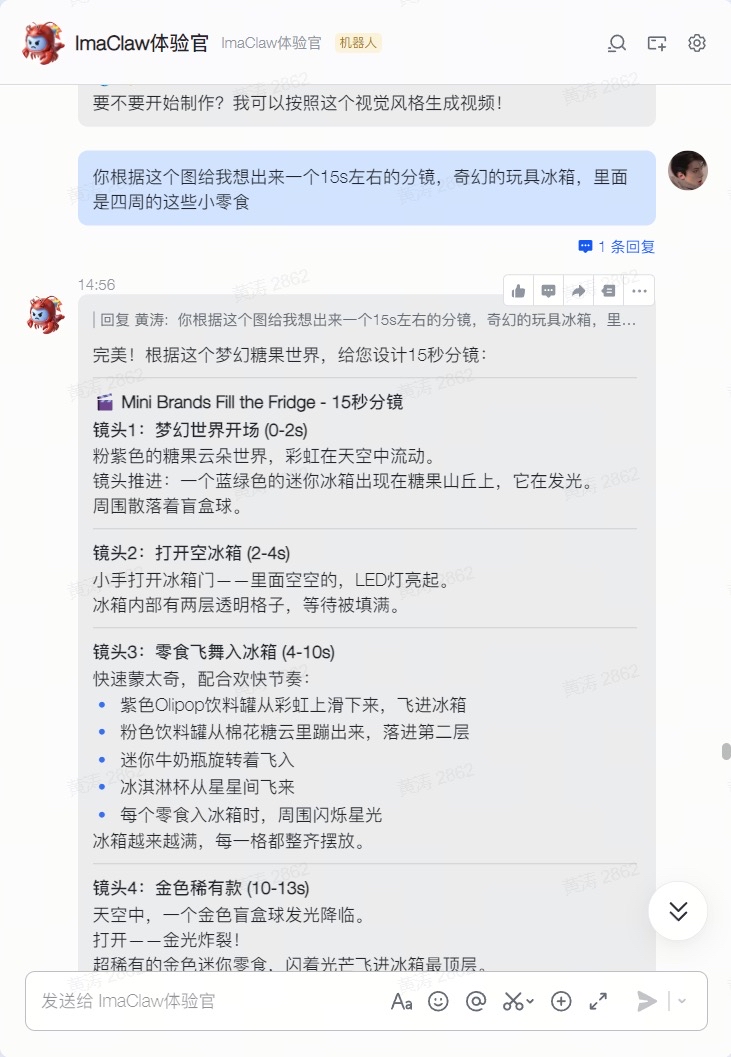
What it replaces: Traditional storyboarding requires a director and planner going back and forth — half a day minimum, sometimes two days. Ima Claw does it in minutes, and you can iterate endlessly until it's right.
Step 2: Use Nano Banana 2 for Initial Product-Scene Compositing
With the storyboard ready, the next step is generating visual assets.
We used Nano Banana 2 (a Gemini-based image generation model) on IMA Studio to create initial composites of the product within the scene concept. The goal isn't a finished product — it's getting a quick "roughly like this" visual reference.
Feed it the Mini Brands product photos and the "candy cloud world" concept, and AI generates preliminary renders of the product in the fantasy setting.
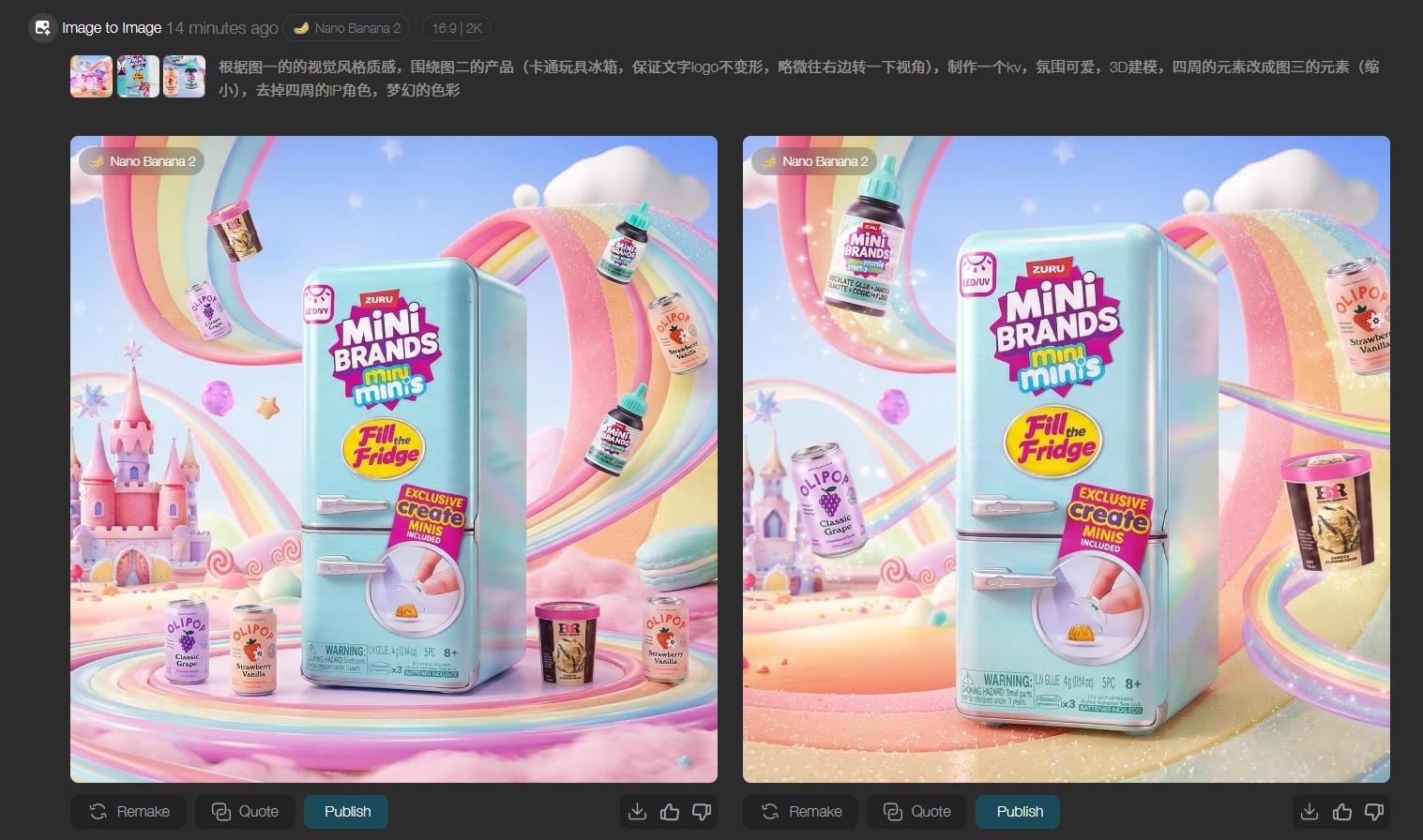
What it replaces: Traditional workflow needs a designer manually cutting, compositing, and color-grading — half a day just for this step. AI does the first draft in seconds. Not happy? Regenerate instantly.
Step 3: Manual Refinement in Photoshop
The AI draft is ready, but human eyes need to sign off.
This step uses Photoshop for post-compositing — mainly adjusting foreground/midground/background layering, fine-tuning color temperature, and making the hero product pop. This is the only step in the entire workflow that requires professional design skills. That said, more than half the videos in the examples above actually skipped this step entirely and went straight from AI output to video.
It depends on your quality bar — brand campaigns that need polish can include this step. Social media ad creatives for rapid testing? Skip it entirely!
Key insight: AI handles speed, humans handle quality. PS refinement ensures professional finish when you need it.
Step 4: Extend Storyboard Frames with Nano Banana 2
Using the refined key frame as a reference, go back to Ima Studio and use Nano Banana 2 to fill out the remaining storyboard panels.
Because you have that first polished image as a style anchor, subsequent generations maintain consistent color tones and scene atmosphere. This step rapidly expands your "ammo" — one key frame can spawn dozens of different angles and compositions.
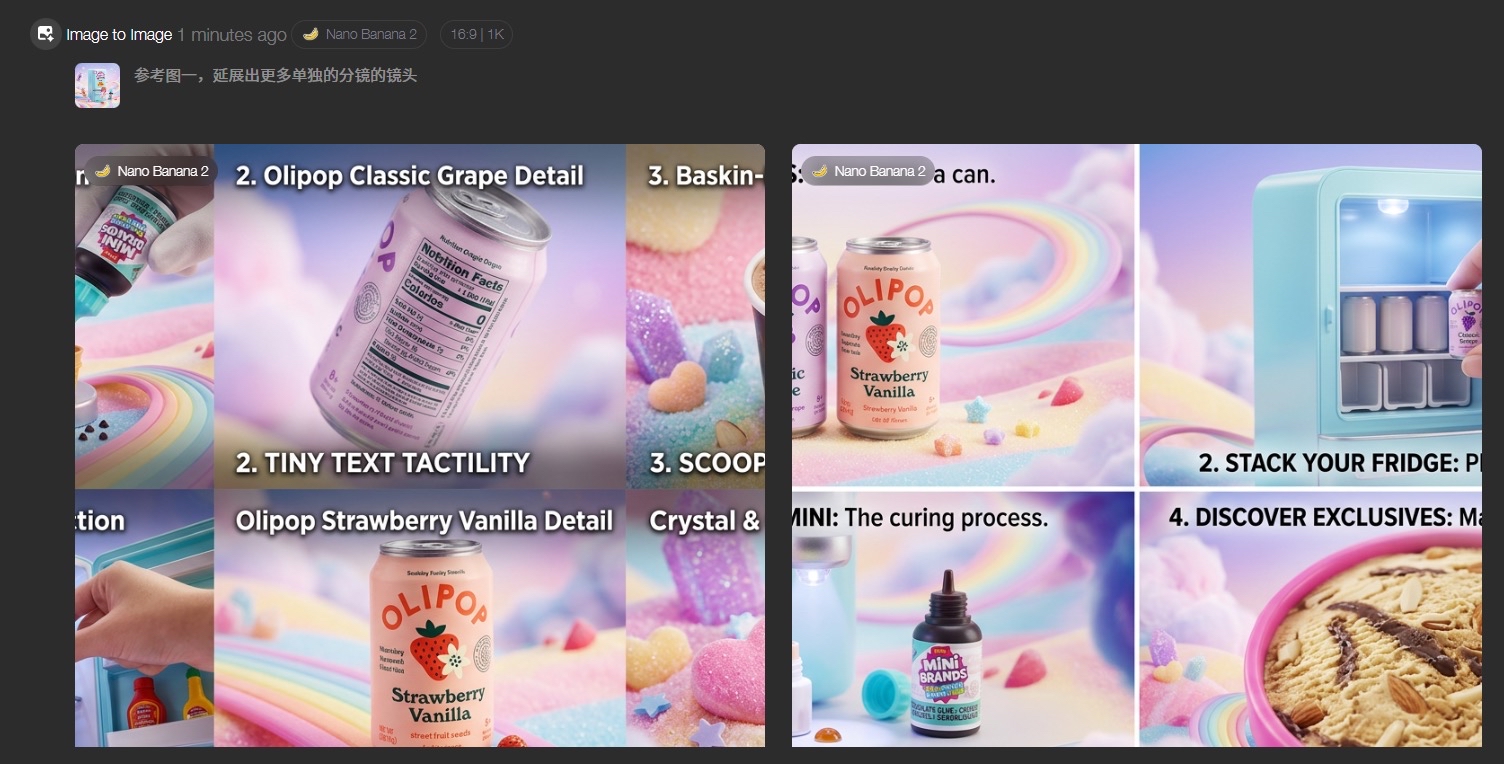
What it replaces: Traditional workflows require designing each storyboard frame individually. Here, one refined image generates an entire batch.
Step 5: Generate Videos with Kling 3.0 or Seedance 2.0
With all storyboard frames ready, feed them to Ima Studio (which integrates Kling, Seedance, Wan, Veo, and virtually every leading model) for image-to-video generation.
Each storyboard image becomes a 3-5 second dynamic video clip. Kling 3.0 and Seedance 2.0 deliver smooth, stable motion without distortion. Some people mention queue times during peak hours — but on Ima Studio, there's no queue at all! It's blazing fast.
What it replaces: Traditional shooting produces a handful of clips per day. Here, dozens of video assets generate simultaneously while you sit back with your coffee.
Step 6: Generate BGM with Suno
Videos done — now they need music.
We used Suno (integrated in Ima Studio and Ima Claw) to generate BGM. Input a few keywords matching your video's style and rhythm (like "dreamy, playful, candy pop"), and you get an original background track in seconds. No copyright worries — all generated music is cleared for commercial use. Complete with English lyrics!
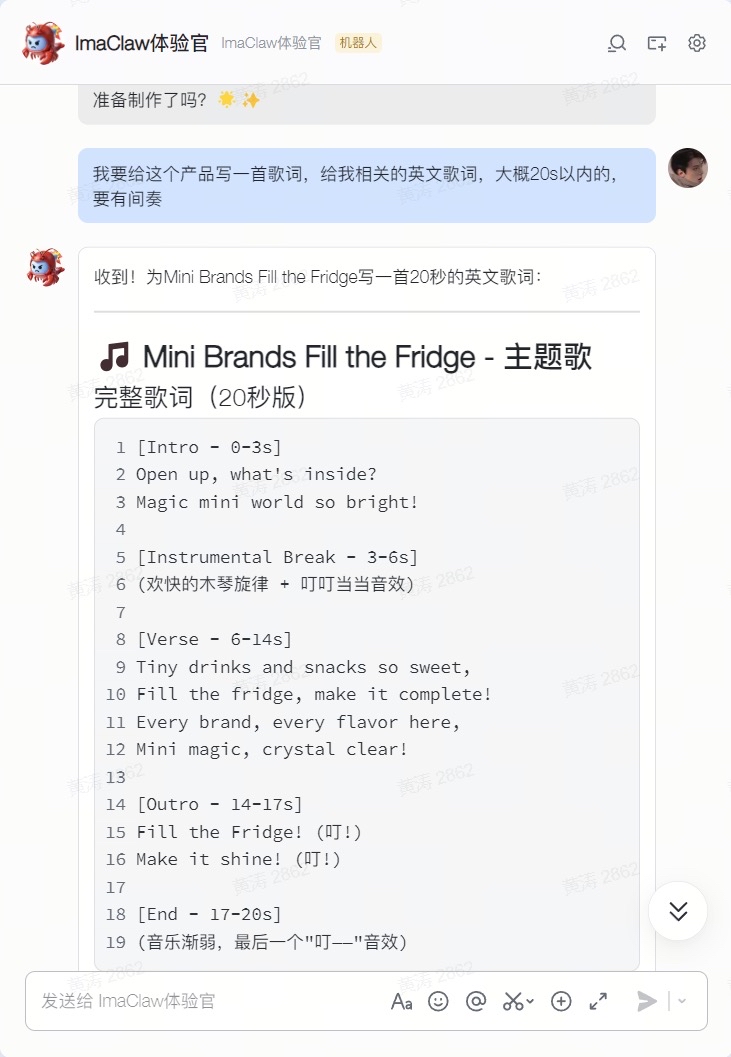
What it replaces: Browsing royalty-free music libraries, purchasing licenses, matching tracks — the traditional process eats up at least half a day.
Step 7: Assemble & Export in CapCut
The final step uses the familiar CapCut (or JianYing in China).
Arrange the generated video clips according to the storyboard, add BGM, transitions, and sound effects, adjust the pacing, and export. Since the previous six steps prepared all the assets, this is basically just snapping Legos together.
PS: Ima Claw can actually handle the stitching too!
Let's Do the Math: How Much Did We Actually Save?
| Step | Traditional | AI Workflow |
|---|---|---|
| Storyboard Planning | 0.5-2 days | Minutes |
| Visual Design | 1-2 days | A few hours (including PS refinement) |
| Video Shooting/Production | 1-3 days | ~15 minutes of generation |
| Music | Half a day | Seconds |
| Total Timeline | 3-7 days | Half a day |
| Cost Per Video | $500-$2,000+ | Under $20 |
There's also a hidden advantage: AI can rapidly produce N versions. Traditional video production means reshooting for every style change. With the AI workflow, swap the style keywords, restart from Step 1, and you have a completely new video in 30 minutes. For ad buying, this means you can A/B test multiple creative directions simultaneously and let data tell you what works.
For example, these videos are all variations from the same product line — incredibly fast to produce! Perfect for deploying across different channels:
Who Is This For?
Honestly, this workflow isn't completely "zero barrier." Step 3's Photoshop refinement still requires someone with design fundamentals — otherwise the visual depth falls flat.
But compared to fully manual production, it hands 80% of the repetitive work to AI. Humans only need to own the critical 20% — creative direction and final quality control.
If you're:
- An e-commerce seller or media buyer being crushed by the speed at which ad creatives burn out
- A small team founder who can't afford a professional video team but needs high-volume assets
- A brand looking to rapidly test different ad creative styles at low cost
This method is worth trying.
What's Next
This is just the beginning.
We're packaging this entire workflow into a dedicated E-commerce Skill on Ima Claw — so you won't need to understand how these seven steps connect. Just tell Ima Claw (your personal lobster) what your product is, who your audience is, and what style you want. It handles the entire pipeline and delivers finished videos.
From "needing a team for several days" to "one person, one afternoon" — AI is redefining the efficiency of e-commerce content production.
This isn't the future. It's happening right now.
Ready to try? Come experience imastudio.com and imaclaw.bot.
Questions or want to discuss your specific use case? Reach out anytime. Fellow e-commerce folks — let's drive those creative costs down together. 🦞